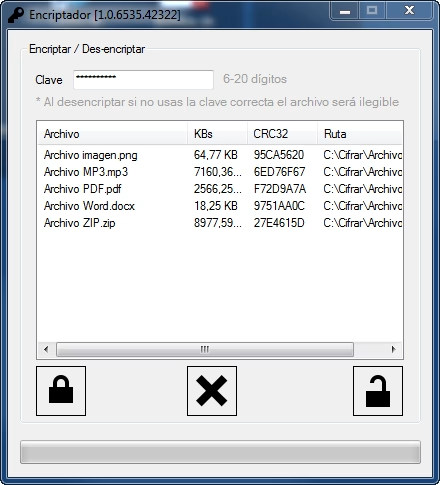
Encriptador/Desencriptador .NET
Intro
Aquí teneis un sencillo encriptador/desencriptador multi-archivo implementando el algoritmo de encriptación Rijndael de 256 bits. El encriptador está basado en el código de
Simplemente abre un nuevo proyecto e introduce 3 botones, un ListView, una caja de texto y una barra de progreso.
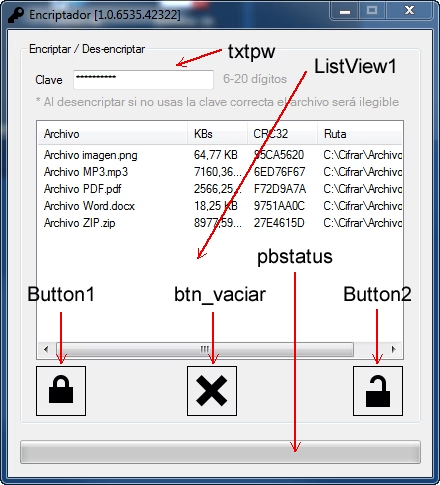
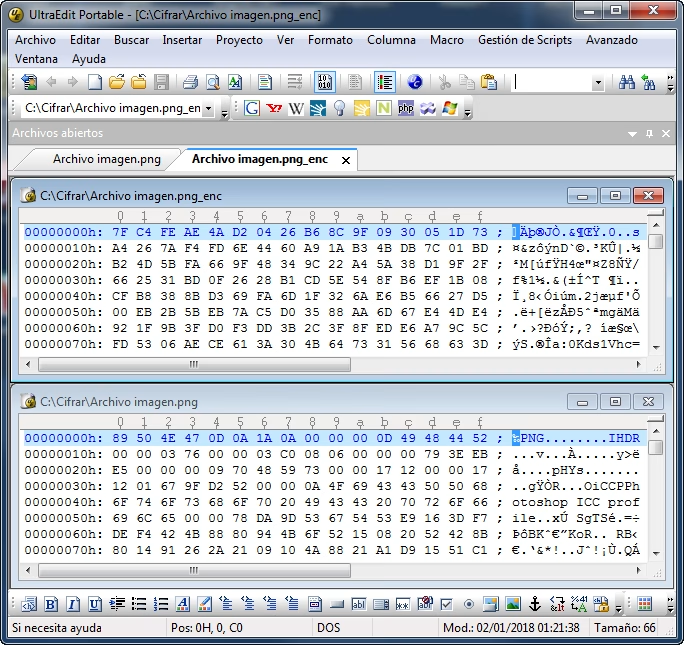
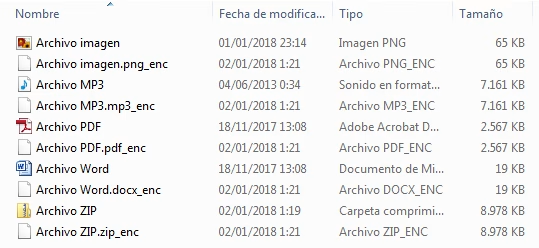
Atención: Si no se utiliza la misma clave al desencriptar, el proceso de desencriptado se completa pero el archivo resultante será ilegible.
Código
Imports System
Imports System.IO
Imports System.Security
Imports System.Security.Cryptography

Public Class form1
    Dim ruta, rutabak As String
    Dim duplicado As Boolean = False

    Public Function CRC32(ByVal sFileName As String) As String
        Try
            Dim FS As FileStream = New FileStream(sFileName, FileMode.Open, FileAccess.Read, FileShare.Read, 8192)
            Dim CRC32Result As Integer = &HFFFFFFFF
            Dim Buffer(4096) As Byte
            Dim ReadSize As Integer = 4096
            Dim Count As Integer = FS.Read(Buffer, 0, ReadSize)
            Dim CRC32Table(256) As Integer
            Dim DWPolynomial As Integer = &HEDB88320
            Dim DWCRC As Integer
            Dim i As Integer, j As Integer, n As Integer

            'Create CRC32 Table
            For i = 0 To 255
                DWCRC = i
                For j = 8 To 1 Step -1
                    If (DWCRC And 1) Then
                        DWCRC = ((DWCRC And &HFFFFFFFE) \ 2&) And &H7FFFFFFF
                        DWCRC = DWCRC Xor DWPolynomial
                    Else
                        DWCRC = ((DWCRC And &HFFFFFFFE) \ 2&) And &H7FFFFFFF
                    End If
                Next j
                CRC32Table(i) = DWCRC
            Next i

            'Calcualting CRC32 Hash
            Do While (Count > 0)
                For i = 0 To Count - 1
                    n = (CRC32Result And &HFF) Xor Buffer(i)
                    CRC32Result = ((CRC32Result And &HFFFFFF00) \ &H100) And &HFFFFFF
                    CRC32Result = CRC32Result Xor CRC32Table(n)
                Next i
                Count = FS.Read(Buffer, 0, ReadSize)
            Loop
            Return Hex(Not (CRC32Result))
        Catch ex As Exception
            Return ""
        End Try
    End Function

    Private Sub form1_Load(ByVal sender As System.Object, ByVal e As System.EventArgs) Handles MyBase.Load
        With ListView1
            .View = View.Details
            .FullRowSelect = True
            .MultiSelect = False
            .HideSelection = False
            .LabelEdit = False
            .Columns.Add("Archivo", 150)
            .Columns.Add("KBs", 60)
            .Columns.Add("CRC32", 70)
            .Columns.Add("Ruta", 120)
        End With
        '
        Me.Text = "Encriptador [" & Application.ProductVersion & "]"
        '
    End Sub

    Private Sub ListView1_DragDrop(ByVal sender As Object, ByVal e As System.Windows.Forms.DragEventArgs) Handles ListView1.DragDrop
        Try
            If e.Data.GetDataPresent(DataFormats.FileDrop) Then
                Dim filePaths As String() = CType(e.Data.GetData(DataFormats.FileDrop), String())
                For Each filePath As String In filePaths
                    'Compruebo duplicados
                    For i = 0 To ListView1.Items.Count - 1
                        If ListView1.Items(i).SubItems(2).Text = CRC32(filePath) Then
                            duplicado = True
                        End If
                    Next
                    If duplicado = False Then
                        Dim chkExt As String = My.Computer.FileSystem.GetFileInfo(filePath).Extension
                        Dim chkSize As String = My.Computer.FileSystem.GetFileInfo(filePath).Length
                        chkSize = chkSize / 1024
                        Dim d As Decimal
                        d = Decimal.Round(chkSize, 2, MidpointRounding.AwayFromZero)
                        Dim LI As ListViewItem
                        LI = ListView1.Items.Add(My.Computer.FileSystem.GetFileInfo(filePath).Name)
                        LI.StateImageIndex = 0
                        LI.SubItems.Add(d & " KB")
                        LI.SubItems.Add(CRC32(filePath))
                        LI.SubItems.Add(filePath)
                    End If
                    duplicado = False
                Next filePath
            End If
        Catch ex As Exception
            MsgBox("Ocurrió el siguiente error: " & ex.Message.ToString)
        End Try
    End Sub

    Private Sub ListView1_DragEnter(ByVal sender As Object, ByVal e As System.Windows.Forms.DragEventArgs) Handles ListView1.DragEnter
        If e.Data.GetDataPresent(DataFormats.FileDrop) Then
            e.Effect = DragDropEffects.Copy
        Else
            e.Effect = DragDropEffects.None
        End If
    End Sub

    Private Function Copiar(ByVal path As String, ByVal path2 As String) As Boolean
        Dim sr As New IO.FileStream(path, IO.FileMode.Open, FileAccess.Read) 'lugar de origen
        Dim sw As New IO.FileStream(path2, IO.FileMode.Create, FileAccess.ReadWrite) 'lugar de destino
        Dim len As Long = sr.Length - 1
        For i As Long = 0 To len
            sw.WriteByte(sr.ReadByte)
            If i Mod 1000 = 0 Then
                pbstatus.Value = i * 100 / len
                Application.DoEvents()
            End If
        Next
        pbstatus.Value = 0
        sr.Close()
        sr.Dispose()
        sw.Close()
        sw.Dispose()
        Return True
    End Function

    Private Sub Button1_Click_1(ByVal sender As System.Object, ByVal e As System.EventArgs) Handles Button1.Click
        'BOTÓN ENCRIPTAR
        Try
            If txtpw.Text <> "" And txtpw.TextLength > 5 Then
                If ListView1.Items.Count > 0 Then
                    Me.Cursor = Cursors.WaitCursor
                    Application.DoEvents()
                    For i = 0 To ListView1.Items.Count - 1
                        ruta = ListView1.Items(i).SubItems(3).Text
                        rutabak = ListView1.Items(i).SubItems(3).Text & "_enc"
                        Do While Copiar(ruta, rutabak) = False
                            'espere
                        Loop
                        Dim bytKey As Byte()
                        Dim bytIV As Byte()
                        bytKey = CreateKey(txtpw.Text)
                        bytIV = CreateIV(txtpw.Text)
                        EncryptOrDecryptFile(ruta, rutabak, bytKey, bytIV, CryptoAction.ActionEncrypt)
                        '
                    Next
                Else
                    MsgBox("Lista de archivos vacía")
                End If
            Else
                MsgBox("Clave no válida" & vbNewLine & "Debe tener al menos 6 dígitos")
            End If
            Me.Cursor = Cursors.Default
            Application.DoEvents()
        Catch ex As Exception
            MsgBox("Ocurrió el siguiente error: " & ex.Message.ToString)
            Me.Cursor = Cursors.Default
            Application.DoEvents()
        End Try
    End Sub

    Private Sub Button2_Click_1(ByVal sender As System.Object, ByVal e As System.EventArgs) Handles Button2.Click
        'BOTÓN DES-ENCRIPTAR
        Try
            If txtpw.Text <> "" And txtpw.TextLength > 5 Then
                If ListView1.Items.Count > 0 Then
                    For i = 0 To ListView1.Items.Count - 1
                        Me.Cursor = Cursors.WaitCursor
                        Application.DoEvents()
                        ruta = ListView1.Items(i).SubItems(3).Text
                        'rutabak = ListView1.Items(i).SubItems(3).Text & "_enc"
                        rutabak = ruta.Remove(ruta.Length - 4)
                        Do While Copiar(ruta, rutabak) = False
                            'espere
                        Loop
                        'DecryptFile(ruta, rutabak, txtpw.Text)
                        '
                        Dim bytKey As Byte()
                        Dim bytIV As Byte()
                        bytKey = CreateKey(txtpw.Text)
                        bytIV = CreateIV(txtpw.Text)
                        EncryptOrDecryptFile(ruta, rutabak, bytKey, bytIV, CryptoAction.ActionDecrypt)
                    Next
                Else
                    MsgBox("Lista de archivos vacía")
                End If
            Else
                MsgBox("Clave no válida" & vbNewLine & "Debe tener al menos 6 dígitos")
            End If
            Me.Cursor = Cursors.Default
            Application.DoEvents()
        Catch ex As Exception
            MsgBox(ex.Message.ToString)
            Me.Cursor = Cursors.Default
            Application.DoEvents()
        End Try
    End Sub

    Private Sub btn_vaciar_Click(ByVal sender As System.Object, ByVal e As System.EventArgs) Handles btn_vaciar.Click
        'BOTÓN VACIAR
        ListView1.Items.Clear()
        pbstatus.Value = 0
    End Sub

    Private Sub ListView1_KeyDown(ByVal sender As Object, ByVal e As System.Windows.Forms.KeyEventArgs) Handles ListView1.KeyDown
        Try
            If e.KeyCode = Keys.Delete Then
                For Each i As ListViewItem In ListView1.SelectedItems
                    ListView1.Items.Remove(i)
                Next
            End If
        Catch ex As Exception
            MsgBox(ex.Message.ToString)
        End Try
    End Sub

#Region "1. Global Variables "

    '*************************
    '** Global Variables
    '*************************

    Dim strFileToEncrypt As String
    Dim strFileToDecrypt As String
    Dim strOutputEncrypt As String
    Dim strOutputDecrypt As String
    Dim fsInput As System.IO.FileStream
    Dim fsOutput As System.IO.FileStream

#End Region

#Region "2. Create A Key "

    '*************************
    '** Create A Key
    '*************************

    Private Function CreateKey(ByVal strPassword As String) As Byte()
        Dim chrData() As Char = strPassword.ToCharArray
        Dim intLength As Integer = chrData.GetUpperBound(0)
        Dim bytDataToHash(intLength) As Byte
        For i As Integer = 0 To chrData.GetUpperBound(0)
            bytDataToHash(i) = CByte(Asc(chrData(i)))
        Next
        Dim SHA512 As New System.Security.Cryptography.SHA512Managed
        Dim bytResult As Byte() = SHA512.ComputeHash(bytDataToHash)
        'Declare bytKey(31).  It will hold 256 bits.
        Dim bytKey(31) As Byte
        For i As Integer = 0 To 31
            bytKey(i) = bytResult(i)
        Next
        Return bytKey 'Return the key.
    End Function

#End Region

#Region "3. Create An IV "

    '*************************
    '** Create An IV
    '*************************

    Private Function CreateIV(ByVal strPassword As String) As Byte()
        Dim chrData() As Char = strPassword.ToCharArray
        Dim intLength As Integer = chrData.GetUpperBound(0)
        Dim bytDataToHash(intLength) As Byte
        For i As Integer = 0 To chrData.GetUpperBound(0)
            bytDataToHash(i) = CByte(Asc(chrData(i)))
        Next
        Dim SHA512 As New System.Security.Cryptography.SHA512Managed
        'Declare bytResult, Hash bytDataToHash and store it in bytResult.
        Dim bytResult As Byte() = SHA512.ComputeHash(bytDataToHash)
        'Declare bytIV(15).  It will hold 128 bits.
        Dim bytIV(15) As Byte
        For i As Integer = 32 To 47
            bytIV(i - 32) = bytResult(i)
        Next
        Return bytIV 'return the IV
    End Function

#End Region


#Region "4. Encrypt / Decrypt File "

    '****************************
    '** Encrypt/Decrypt File
    '****************************

    Private Enum CryptoAction
        ActionEncrypt = 1
        ActionDecrypt = 2
    End Enum

    Private Sub EncryptOrDecryptFile(ByVal strInputFile As String, _
                                     ByVal strOutputFile As String, _
                                     ByVal bytKey() As Byte, _
                                     ByVal bytIV() As Byte, _
                                     ByVal Direction As CryptoAction)
        Try
            fsInput = New System.IO.FileStream(strInputFile, FileMode.Open, _
                                               FileAccess.Read)
            fsOutput = New System.IO.FileStream(strOutputFile, FileMode.OpenOrCreate, _
                                                FileAccess.Write)
            fsOutput.SetLength(0) 'make sure fsOutput is empty
            Dim bytBuffer(4096) As Byte 'holds a block of bytes for processing
            Dim lngBytesProcessed As Long = 0 'running count of bytes processed
            Dim lngFileLength As Long = fsInput.Length 'the input file's length
            Dim intBytesInCurrentBlock As Integer 'current bytes being processed
            Dim csCryptoStream As CryptoStream
            'Declare your CryptoServiceProvider.
            Dim cspRijndael As New System.Security.Cryptography.RijndaelManaged
            pbStatus.Value = 0
            pbStatus.Maximum = 100

            Select Case Direction
                Case CryptoAction.ActionEncrypt
                    csCryptoStream = New CryptoStream(fsOutput, _
                    cspRijndael.CreateEncryptor(bytKey, bytIV), _
                    CryptoStreamMode.Write)

                Case CryptoAction.ActionDecrypt
                    csCryptoStream = New CryptoStream(fsOutput, _
                    cspRijndael.CreateDecryptor(bytKey, bytIV), _
                    CryptoStreamMode.Write)
            End Select

            While lngBytesProcessed < lngFileLength
                'Read file with the input filestream.
                intBytesInCurrentBlock = fsInput.Read(bytBuffer, 0, 4096)
                'Write output file with the cryptostream.
                csCryptoStream.Write(bytBuffer, 0, intBytesInCurrentBlock)
                'Update lngBytesProcessed
                lngBytesProcessed = lngBytesProcessed + CLng(intBytesInCurrentBlock)
                'Update Progress Bar
                pbStatus.Value = CInt((lngBytesProcessed / lngFileLength) * 100)
            End While

            csCryptoStream.Close()
            fsInput.Close()
            fsOutput.Close()

            If Direction = CryptoAction.ActionEncrypt Then
                Dim fileOriginal As New FileInfo(strFileToEncrypt)
                fileOriginal.Delete()
            End If

            If Direction = CryptoAction.ActionDecrypt Then
                Dim fileEncrypted As New FileInfo(strFileToDecrypt)
                fileEncrypted.Delete()
            End If

            Dim Wrap As String = Chr(13) + Chr(10)
            If Direction = CryptoAction.ActionEncrypt Then
                MsgBox("Encryption Complete" + Wrap + Wrap + _
                        "Total bytes processed = " + _
                        lngBytesProcessed.ToString, _
                        MsgBoxStyle.Information, "Done")
                pbStatus.Value = 0
            Else
                pbStatus.Value = 0
            End If


            'Catch file not found error.
        Catch When Err.Number = 53 'if file not found
            MsgBox("Please check to make sure the path and filename" + _
                    "are correct and if the file exists.", _
                     MsgBoxStyle.Exclamation, "Invalid Path or Filename")

        Catch
            fsInput.Close()
            fsOutput.Close()

        End Try
    End Sub

#End Region
End Class
Vídeo
https://youtu.be/6NksaI0SAA8
Un comentario en «Encriptador/Desencriptador .NET»
Hola descubri el error del porque al introducir la contraseña erronea el archivo devuelto queda ilegible y esporque hay que invertir tus texbox
Catch
fsInput.Close()
fsOutput.Close()
If Direction = CryptoAction.ActionDecrypt Then
Dim fileDelete As New FileInfo(ComboBox_ruta_salida.Text)
fileDelete.Delete()
ProgressBar_progreso.Value = 0
TextBox_contrasena.Select()
‘Timer1.Stop()
MsgBox(«LA CONTRASEÑA DE DESCIFRADO ES INCORRECTA, VUELVA A INTENTARLO!», MsgBoxStyle.Exclamation, «Contraseña incorrecta»)
TrackBar_activar_cifrado.Value = 10
Label_activar_cifrado.Text = «Archivo cifrado»
Label_progress.Text = «Progreso»
Else
Dim fileDelete As New FileInfo(DataGridView_lista_archivos.CurrentRow.Cells(0).Value.ToString)
fileDelete.Delete()